A colleague pings you on a Tuesday: “Hey — do we have NX Motion? Can you get me access?”
You manage thirty-odd license servers across three sites, a renewal calendar that never fully empties, and a vendor naming scheme that calls the thing nx_motion_ult on one server and something slightly different on another. You’re not even certain “NX Motion” is the real feature name. The honest answer to your colleague is “give me a bit” — and then comes the part where you run lmstat after lmstat, SSH into the boxes, crack open license files, and search them for whatever you think the feature might be called.
That afternoon is the problem this article is about. Almost every license question your team gets reduces to one of three shapes:
- Where is it? — You half-know a name and need to find where it lives across the estate.
- Why can they use it and I can’t? — Two people, same application, different luck. One gets a license, the other gets a message saying the feature doesn’t exist.
- When did this change? — A quantity dropped, a feature vanished, an expiration moved, and someone wants to know when — and ideally why.
LiMon has a dedicated screen to answer each one. None of them require you to remember a server, a port, or exactly what the vendor calls the feature.
“Where is it?” — Estate license search
The first screen is the one your colleague’s question lands on. In the LiMon navigation it’s called Find a License, and it does exactly one thing: you type part of a name, and it tells you everywhere that feature exists across every monitored server.
The detail that makes it usable on a real estate is what it matches against. License servers speak in raw vendor mnemonics — nx_motion_ult, CATIA_V5_HARDWARE, 86984ACD2025. Humans speak in product names — “NX Motion,” “CATIA Hardware Design,” “AutoCAD 2025.” LiMon maintains a mapping between the two (that’s a separate story), and the search box matches your term against both the raw feature name and the resolved friendly display name. So “NX Motion,” “nx_motion,” or just “motion” all find the same thing. You don’t have to already know the answer to ask the question — two characters is enough to start.
Results come back grouped by feature, and that grouping is the whole point. For each match you get:
- The raw vendor feature name and the friendly display name side by side.
- An estate-wide total — how many of this license you own across everything, and how many distinct servers carry it.
- A per-location breakdown — every server holding the feature, each with its own quantity, expiration date (blank means perpetual), site label, and current status (
UP,DOWN,ERROR, decommissioning).
That last list is what closes the ticket. Your colleague asked where NX Motion is; the answer is now concrete — “7 seats of NX Motion Ultimate across two servers — 5 in Munich, 2 in Turin on a box that’s currently down — plus 4 of NX Motion Simulation on the RLM server in Munich” — instead of a promise to look into it. The results pulled back both the FlexLM nx_motion_ult and the RLM NXMOTIONSIM under their friendly names, which is exactly the exact-name-doesn’t-matter behavior you want. And if nothing matches, the search says so plainly: an empty result is a legitimate, fast “we don’t have that,” not an error and not an ambiguous silence.
This is the screen that replaces an afternoon of SSH and grep. One search, the whole estate, across both the feature’s raw code name and its friendly name as mapped in LiMon.
“Why can they use it and I can’t?” — Feature coverage
The second question is sneakier, because on the surface it looks like a bug. Two engineers, both using what the company calls “HyperWorks.” One checks out a license and gets to work. The other gets denied — even though there are free seats to spare and colleagues can access the very same feature at that moment — and naturally assumes something is broken.
Often nothing is broken. The application is simply served from more than one license server — different sites, regional servers, an independent box for a particular team — and those servers don’t carry an identical set of features. The engineer who succeeded happened to be pointed at a server that has the feature they needed. The one who failed was pointed at a server that doesn’t. Same application name, different inventory underneath.
LiMon surfaces this on the application detail page as Feature Coverage. It takes one application, looks at all of its active production servers, and reports the features that are not present on every one of them. The rule it applies is deliberately simple:
- It compares production deployments only. Test and dev servers, which routinely differ, don’t muddy the picture.
- A feature counts as present on a server when that server actually licenses it — quantity is ignored. This view answers “is it there at all?”, not “is it big enough.” (For “is it big enough,” that’s the usage and savings analysis, a different screen.)
- It needs at least two production servers to mean anything. With one server there’s nothing to compare, and LiMon hides the view rather than show you a trivially “complete” answer.
When every production server carries every feature, the view tells you so in one line — all features present on every production server — and you can stop looking; the denial is something else (a quantity ceiling, a user-host restriction, a borrowed/roamed seat). But when there’s a gap, the view lists exactly the features with a hole in their coverage — anything present on every server drops out, so what’s left is the problem set — and a green check or a grey dash shows which servers carry each one and which don’t:
This answers questions like “Do we have feature X at the Munich office? And if not, where is it?” on the spot. The denied engineer needed MotionSolve, their workstation was pointed at the Munich server, and Munich doesn’t carry it — denied — while colleagues checking out from the London LM-X box never saw a problem. The “bug” is a coverage gap, and now it has a name and a location. What’s left is a decision: add the feature to the servers that lack it, repoint that team at a server that has it, or confirm the gap is intentional and let the engineer know they’re not contractually entitled to that feature. Either way you’re no longer guessing.
A note on what this view is and isn’t: it reports server-level presence, not who got denied. It won’t list the affected users or replay the denial events — that comes with the denial analysis in the reports. What Feature Coverage gives you is the structural explanation sitting underneath the complaint, which is usually the part that’s hard to see and easy to argue about.
“When did this change?” — License history
The third question shows up after the fact. The pool that used to have 50 seats now shows 45. A feature you’d swear was there is gone. An expiration date you were counting on for the renewal conversation has changed, and nobody remembers why. Someone — maybe you, three months ago — made a change, and now you need the paper trail.
LiMon keeps that trail automatically. Every polling cycle, it compares each server’s current license inventory against what it last saw, and any difference becomes a dated, typed entry in License Inventory Changes. You don’t enable it or configure anything; it’s a side benefit of monitoring.
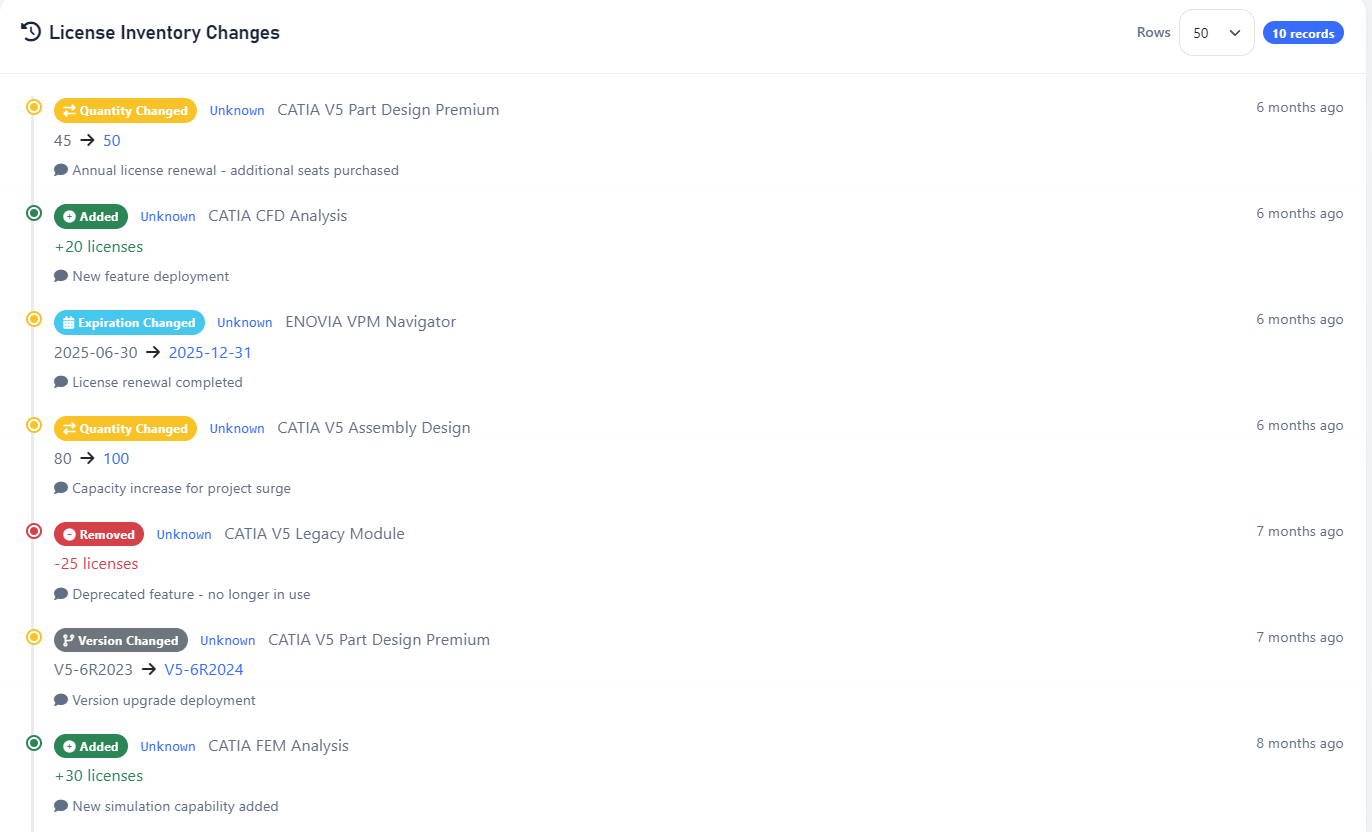
It tracks five kinds of change, and the timeline color-codes each so the trail of a renewal is legible at a glance:
- Added — a feature appeared on a server that didn’t have it (a new entitlement, a deployment).
- Removed — a feature dropped off entirely (a lapsed module, a decommission).
- Quantity Changed — the seat count moved, shown as a plain 45 → 50.
- Version Changed — the licensed version rolled forward, e.g. V5-6R2023 → V5-6R2024.
- Expiration Changed — a feature’s expiry date moved, e.g. 2025-06-30 → 2025-12-31, which is the receipt that a renewal actually landed.
Each entry carries the feature, the server it happened on, the before → after values, and a timestamp. And because the what and when are captured automatically but the why lives in someone’s head, every entry takes an optional reason you can annotate from the Admin UI — “Annual license renewal — additional seats purchased,” “Deprecated feature — no longer in use.” Six months later, when finance asks why the CATIA line went up, the answer is already written next to the event instead of being reconstructed from email.
For the cases the poller can’t see — a paper change, a future-dated purchase you want on record before it shows up in lmstat — you can also add entries by hand from the Admin UI, so the history stays complete rather than only reflecting what a server happened to report.
In the frontend, you can see this history on each server’s and each application’s detail page. In the Admin UI, you get every change across the whole estate in a single view, filterable by server, by feature, and more. That’s the difference between “I think we bumped CATIA last spring” and “we went 80 → 100 on March 14th, and we logged why.”
Three questions, one estate
The three screens answer three questions you’ll keep getting about your license estate:
- Find a License answers where — the whole estate, either spelling of the name, in one search.
- Feature Coverage answers why access differs — the structural gap between an application’s servers that explains some denials.
- License Inventory Changes answers when and why it changed — an automatic, annotated audit trail.
What they share is that none of them ask you to already know the answer. You don’t supply a server, a port, or the exact vendor mnemonic; you supply the fuzzy thing you actually have — a half-remembered name, a confused user, a number that moved — and LiMon resolves it against the inventory it’s been quietly maintaining the whole time. That’s the real shift: license management stops being a memory test.
Where LiMon fits
LiMon polls FlexLM, RLM, LM-X, and DSLS servers across your network, keeps a live picture of what every one of them carries, and turns that into the search, coverage, and history views above — plus utilization analysis, audit-defense documentation, and real data for your renewal conversations. It runs on your hardware: no cloud, no agents on the license servers, no phone-home. Request an evaluation to point it at your own estate, then choose Standard or Professional for the server scale and analytics that fit it. (All the features discussed in this article are available on Standard and Professional.)