On-premises by design
LiMon runs inside your environment. There is no SaaS control plane, no telemetry requirement, and no outbound call needed to validate the license key.
Required paths are narrow
The core product needs user access to the UI plus internal reachability to your existing license servers. Database traffic stays inside the appliance boundary.
Integrations stay under your control
AD/LDAP, SMTP, Slack, Teams, and generic webhooks are optional. In air-gapped environments they can be disabled or pointed to internal relay services.
Architecture At A Glance
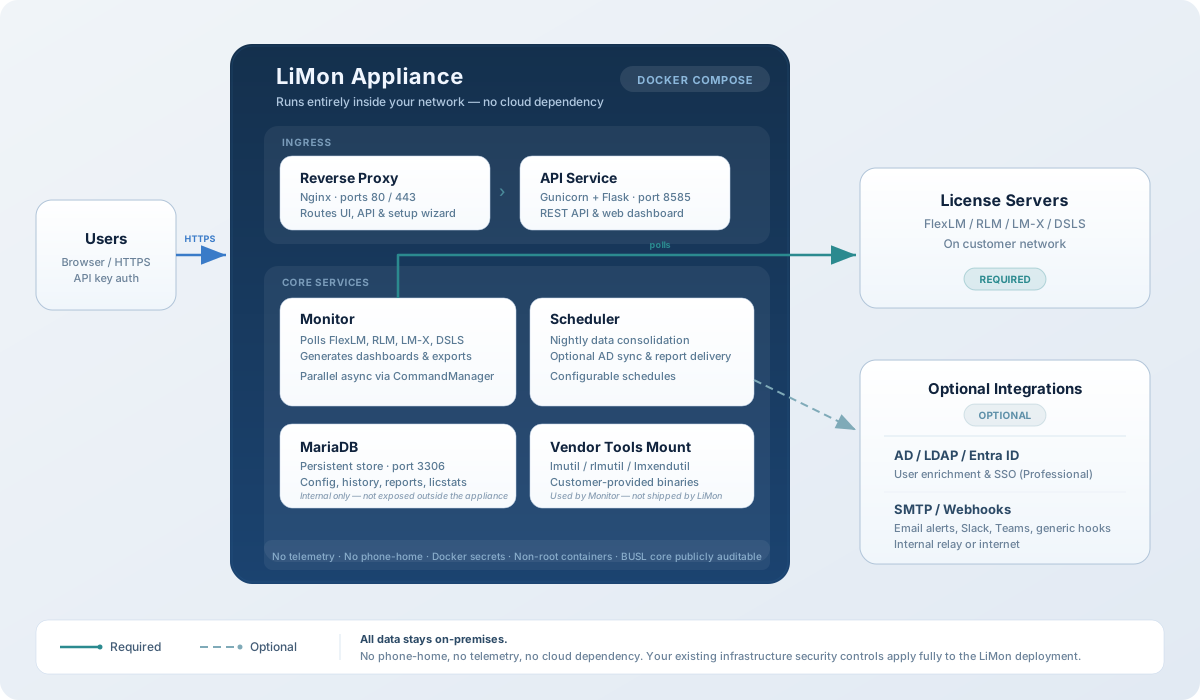
The diagram shows the Docker appliance. Native package deployments expose the same application services on Gunicorn port 8585 instead of bundling nginx, and the customer must provide the database server separately.
What Runs Inside Your Network
Web UI and API
In the Docker appliance, nginx terminates HTTP/TLS and routes /api/ and /setup/ to the internal Gunicorn API service. In package deployments, Gunicorn serves the application directly on 8585.
Polling, scheduler, and database
The monitor polls FlexLM, RLM, LM-X, and DSLS servers, stores state in MariaDB, and runs scheduled jobs for consolidation, reporting, and optional directory sync.
No customer data has to leave the network
License verification is local. LiMon uses signed keys that are checked inside the product, so the platform does not need to phone home to activate or continue operating.
Required And Optional Network Paths
| Source | Destination | Ports / Protocol | Required | Purpose |
|---|---|---|---|---|
| User browser | LiMon UI | 80/443 in Docker, or 8585 in package mode |
Yes | Access the dashboard, setup wizard, admin UI, and API-backed views. |
| LiMon proxy | LiMon API | Internal 8585 |
Docker only | Routes /api/ and /setup/ to the Gunicorn service. |
| LiMon app services | MariaDB | Internal 3306 |
Yes | Persist configuration, usage history, sessions, report metadata, and license state. |
| LiMon monitor | License servers | Your existing vendor server ports | Yes | Poll FlexLM, RLM, LM-X, and DSLS servers already running in your environment. |
| LiMon scheduler | AD / LDAP | Typically 636 for LDAPS |
Optional | Enrich users with directory metadata such as department, title, and employment status. |
| LiMon | SMTP relay | Organization-defined | Optional | Send alert emails and scheduled report deliveries. |
| LiMon | Slack / Teams / webhook relay | Organization-defined HTTPS or internal webhook endpoint | Optional | Deliver operational notifications in Professional deployments. |
For LiMon itself, the important defaults are 80/443, 8585, and internal 3306. License-server ports are not imposed by LiMon; they are the ports already used by your FlexLM, RLM, LM-X, or DSLS estate.
Deployment Options
Docker appliance
- Six containers: proxy, API, monitor, scheduler, report worker (PDF generation), and MariaDB.
- nginx handles HTTP/TLS and keeps the database on the internal network boundary.
- Good fit when you want the most complete packaged deployment with the fewest moving parts to assemble yourself.
Native package
- DEB and RPM packages expose the application directly on Gunicorn port
8585. - The package does not include a reverse proxy; expose Gunicorn directly or put your own nginx, Apache, or corporate ingress in front.
- Good fit when you want LiMon to use your existing database, reverse proxy, or ingress standards.
Security Notes That Matter In Review
- LiMon does not ship vendor license utilities. Customers provide the binaries required to talk to their own license managers.
- Optional services such as SMTP, LDAP, and webhooks can be disabled without breaking core monitoring.
- In Docker deployments the proxy generates a self-signed certificate by default; customers can replace it with their own certificate chain.
- The admin interface is separate from the user facing interface. This page covers the product boundary, not the website architecture.